

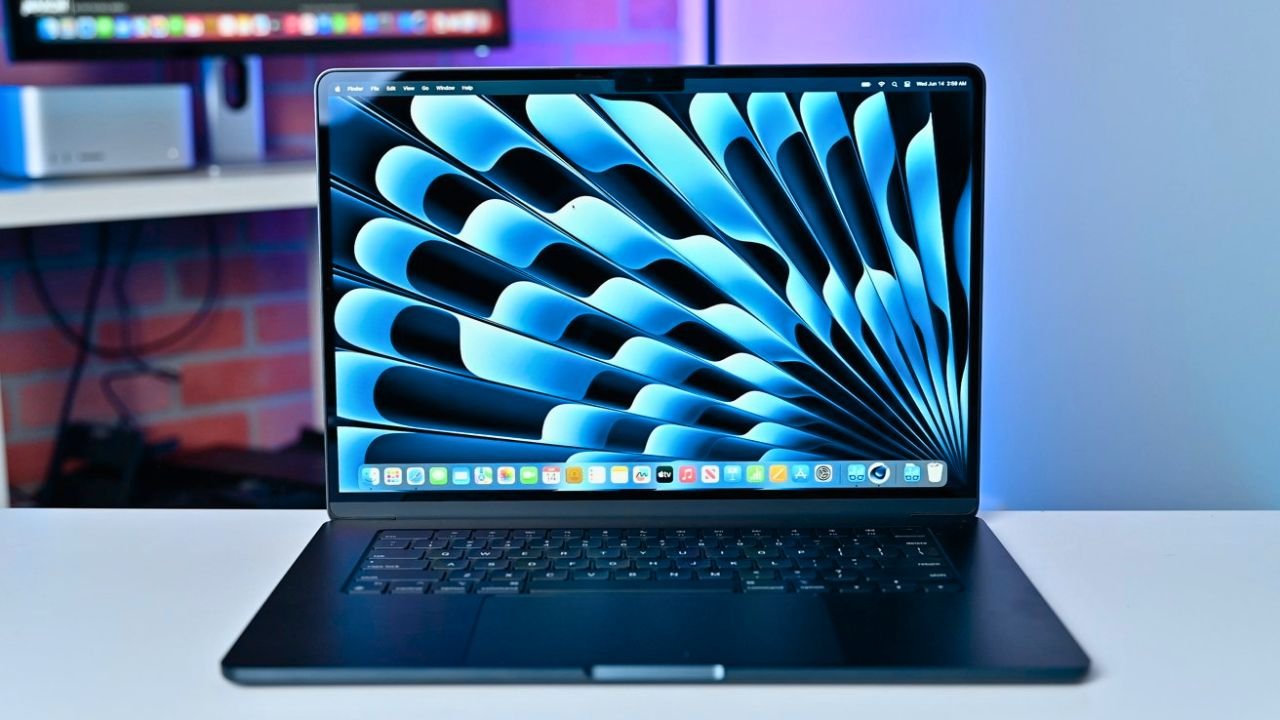
If you are planning to buy a MacBook in 2026, the MacBook Air with the M4 chip is still one of the most popular options. Apple has already introduced newer devices like the M5 MacBook Air and MacBook Neo, which makes many buyers wonder whether the M4 model is still a smart purchase.
The short answer is yes for many users. But it depends on what type of work you plan to do.
According to Apple’s official specifications, the MacBook Air M4 focuses on efficiency, strong single-core performance, and long battery life rather than raw graphics power. This is why it remains a popular choice among students and professionals.
Source: https://www.apple.com/macbook-air/
MacBook Air M4 Specifications
| Feature | Details |
|---|---|
| Processor | Apple M4 chip |
| Display | 13.6-inch Liquid Retina |
| Resolution | 2560 × 1664 |
| Brightness | Up to 500 nits |
| RAM | Starts at 16 GB |
| Storage | 256 GB / 512 GB options |
| Weight | Around 1.3 kg |
| Ports | MagSafe charging, 2× Thunderbolt USB-C, Headphone jack |
| Security | Touch ID |
| OS | macOS with Apple Intelligence |
Design and Build Quality
The MacBook Air M4 continues Apple’s minimalist design approach. It uses a full aluminum unibody chassis, which gives it a solid and premium feel.
Because of the metal build, the laptop feels durable and does not flex easily. The hinge is stable and the lid opens smoothly. Apple laptops are generally known for their long lifespan, and the Air series follows that reputation.
At around 1.3 kg, the device is also highly portable. Students and remote workers who travel frequently will appreciate the lightweight design.
Color options remain similar to previous models, including options like silver, starlight, midnight, and sky blue.
Display and Speaker Quality
One of the strongest parts of the MacBook Air lineup has always been the display and speakers.
The laptop features a 13.6-inch Liquid Retina display with a resolution of 2560 × 1664. Pixel density is high enough that text and images look sharp even at close viewing distances.
Key display highlights include:
- P3 wide color support
- Up to 1 billion colors
- 500 nits brightness
This makes the screen suitable for media consumption, design work, and general productivity.
The speakers are also impressive for a thin laptop. Audio is clear and loud enough for watching movies, listening to music, or attending video meetings.
The only limitation is that the display refresh rate remains 60 Hz, which some users may consider outdated compared to newer high-refresh laptops.
Ports, Keyboard, and Trackpad
The MacBook Air M4 keeps a simple port layout.
It includes:
- MagSafe charging port
- Two Thunderbolt USB-C ports
- 3.5 mm headphone jack
For many users this is enough, but if you frequently use USB-A devices or SD cards, you will probably need a USB-C hub.
The Magic Keyboard remains one of the best laptop keyboards available. The typing experience feels comfortable for long writing sessions, programming, or documentation work.
The Force Touch trackpad is also widely regarded as the best trackpad in any laptop. It supports advanced gestures and provides precise feedback.
macOS Experience
The macOS experience is one of the main reasons many users choose a MacBook.
For new users switching from Windows, the interface may take some time to learn because shortcuts and system navigation are different. But once users get used to it, the experience generally feels smoother and more stable.
macOS updates also arrive regularly, and Apple typically supports MacBooks for several years. Most MacBooks remain usable for five to six years with software updates.
Apple Intelligence Features
Another major addition in newer MacBooks is Apple Intelligence.
This AI system includes features like:
- Writing tools for rewriting and proofreading text
- Summarizing documents or PDFs
- Image editing tools like object removal
- Image generation through creative apps
- Voice interactions with the updated Siri
These tools aim to improve productivity and assist users with everyday tasks. The M4 chip includes a strong neural engine, which helps handle these AI features efficiently.
Performance and Real-World Usage
In everyday usage, the MacBook Air M4 performs very well.
Typical tasks that run smoothly include:
- Web browsing
- Office work and presentations
- Programming and coding
- Online classes and meetings
- Photo editing
- Light to moderate video editing
The laptop now starts with 16 GB RAM, which significantly improves multitasking. For video editing, the machine can handle 4K editing with multiple layers in most software without major issues.
However, it is important to understand one limitation. The MacBook Air does not have an internal cooling fan. For extremely heavy workloads such as long 3D rendering sessions or advanced motion graphics, the MacBook Pro series is a better option.
Gaming on MacBook Air M4
Gaming is not the main purpose of the MacBook Air, but it can run some supported titles. Some modern games now have native macOS versions, and others can run through compatibility tools.
Casual gaming works fine, but if gaming is your main priority, a Windows gaming laptop will still provide better compatibility and performance.
MacBook Air M4 vs M5 Air and MacBook Neo
With new Apple laptops launching, buyers often compare options.
Compared to MacBook Neo
The MacBook Air M4 is generally a better device because it includes:
- Backlit keyboard
- Force Touch trackpad
- Touch ID security
- More powerful processor
Compared to MacBook Air M5
The newer M5 Air mainly introduces a slightly faster processor and sometimes higher base storage. However, in real-world tasks the difference may not be dramatic for most users. If the M4 version is available at a significantly lower price, it can still be the smarter purchase.
Final Verdict: Should You Buy MacBook Air M4 in 2026?
Yes, the MacBook Air M4 is still worth buying in 2026.
It remains a strong choice for:
- Students
- Writers and bloggers
- Developers
- Office professionals
- Content creators doing light editing
The combination of strong battery life, excellent build quality, macOS stability, and the efficient M4 chip makes it a reliable laptop that can easily last several years.
Unless you specifically need higher graphics performance or heavy professional workloads, the M4 Air still delivers excellent value.