
It’s actually surprising how the Android smartwatch conversation usually goes. Whenever someone asks which smartwatch to buy, most people immediately say the same thing: just buy a Samsung Galaxy Watch. And if someone wants to spend more money, then the recommendation suddenly becomes Apple Watch.
But very rarely does anyone mention Google’s Pixel Watch.
And that’s strange because Google has been launching Pixel Watches for almost four years now. Yet most people still ignore them completely. Honestly, I was also one of those people for a long time. But this year I decided to actually buy the Pixel Watch 4 and use it for a full month before forming an opinion.
After using it daily, I can confidently say something surprising: this watch is seriously underrated. It might not be perfect, but it absolutely deserves to be in the same conversation as Samsung and Apple watches.
Design: One of the Best Looking Smartwatches
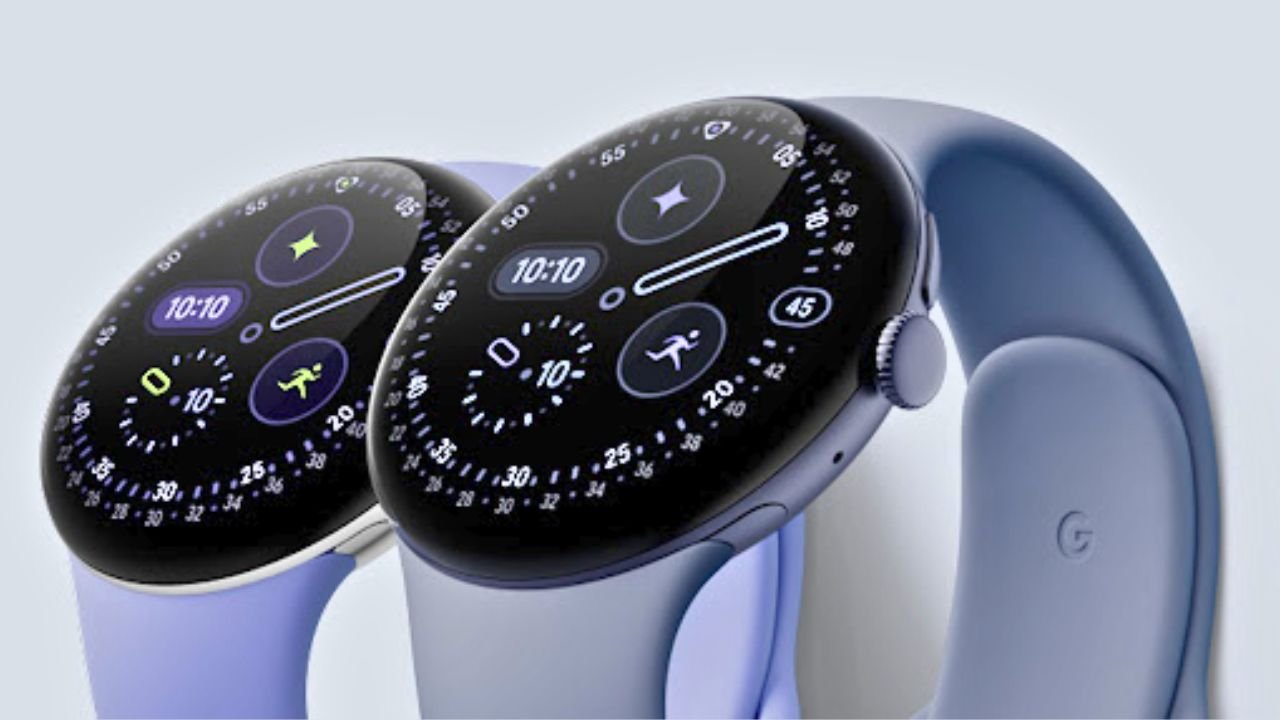
The first thing you notice when you wear the Pixel Watch 4 is the design. Google has done an excellent job here.
The watch has a dome-shaped curved glass that covers the entire dial. Because of that curved design, the watch face almost looks like it has depth inside it. It actually reminds me of certain luxury watches that use oil-filled dials to create a similar visual effect.
In real life, the Pixel Watch dial looks extremely unique.
Compared to many other smartwatches that feel more like mini phones on your wrist, this one actually looks like a proper watch. It’s clean, minimal, and elegant. On the wrist it feels premium rather than tech-heavy.
Of course, when you see such a curved display, the first thought that comes to mind is durability. I also had the same concern before using it. A curved glass surface looks beautiful but it also feels like it could scratch easily.
After one month of use, I can say the durability is decent. The watch did touch different surfaces during daily use and even fell once while I was removing it. It ended up with a tiny scratch that is only visible under certain lighting conditions.
So while it is not indestructible, it is durable enough for normal use.
Crown, Haptics & Controls
The rotating crown on the Pixel Watch works really well. When you scroll using the crown, the haptic feedback feels precise and satisfying. Google has clearly paid attention to how the watch feels during interaction.
In fact, the haptic feedback throughout the UI is one of the strong points of this watch.
The only place where it feels slightly off is notifications. The vibration for notifications sometimes feels a bit too heavy and slightly cheap. However, when you receive calls the vibration feels much better.
The watch bands initially felt a bit tricky to attach, but once you understand the mechanism it becomes easy.
Charging & Battery Life
One interesting thing about the Pixel Watch 4 is the charging method. Instead of wireless charging, Google uses pogo pins for charging. You simply place the watch horizontally on the charger and it connects instantly.
This approach actually has an advantage. The watch charges very quickly. In my testing, it took around 45 minutes to fully charge, which is genuinely impressive for a smartwatch. But the real highlight is battery life.
Battery Life Comparison
| Smartwatch | Typical Battery Life |
|---|---|
| Samsung Galaxy Watch | ~24 hours |
| Apple Watch Series 11 | ~30–32 hours |
| Pixel Watch 4 | ~48 hours |
The Pixel Watch 4 easily lasted two days on a single charge in my usage.
And this was not light usage.
I kept Always-On Display enabled during the day, used voice commands through Gemini, tracked workouts regularly, and used timers and reminders frequently. Even with that type of usage, the watch consistently reached around 48 hours.
For a full-featured smartwatch, that’s impressive.
Display Quality & Brightness
The display itself is very bright and clear.
Google claims around 3000 nits brightness, and in outdoor usage I never faced visibility issues. Even under sunlight the screen remained readable. However, there is one small criticism.
The bezels are slightly thicker compared to some competing watches. Google hides them cleverly through consistent UI design so that they don’t stand out visually. But if you look carefully, they are noticeable.
Software Experience: Pixel Magic on the Wrist
This is where the Pixel Watch really stands out.
Google’s Wear OS interface combined with Material You design makes the UI feel clean and modern. The watch faces are especially well designed. Some watch faces are minimal with just the time, while others can display a lot of information like weather, heart rate, and activity stats.
Customization is also very flexible. You can change colors, layouts, and complications easily.
Animations are smooth and the UI rarely stutters.
Another cool feature is automatic sleep mode. If you fall asleep while wearing the watch, it automatically switches to sleep mode without needing manual activation. That’s something many other smartwatches still require you to configure manually.
Gemini AI on the Pixel Watch
The integration of Gemini AI on the watch is surprisingly useful. You can simply speak to the watch and ask it to perform tasks like:
- Setting timers
- Asking quick questions
- Starting workouts
- Checking reminders
There is also a Raise-to-Talk feature, where the watch automatically starts listening when you raise your wrist and begin speaking.
However, this feature sometimes misfires. A few times during conversations with other people, the watch randomly activated Gemini and started responding.
Pixel Phone Exclusive Features
While the Pixel Watch works with most Android phones, some features are exclusive to Pixel smartphones.
These include:
- Alarm Sync – alarms set on your Pixel phone automatically appear on the watch
- Camera Control – the watch can act as a camera viewfinder for your Pixel phone
With the camera control feature, you can preview the phone’s camera directly on the watch and capture photos or videos remotely. Unfortunately, these features don’t work with non-Pixel phones.
Health & Fitness Tracking
Pixel Watch uses the Fitbit platform for health tracking.
One interesting feature inside Fitbit is Cardio Load. It analyzes your resting heart rate and workout intensity to calculate a score that helps determine how much you should train that day.
This is actually a useful concept because it balances recovery and training.
However, smartwatch health tracking has one limitation compared to dedicated fitness bands like Whoop. Devices like Whoop measure heart rate continuously every second, while most smartwatches measure it at intervals. Because of this difference, calorie tracking and heart rate accuracy can vary slightly.
Sleep Tracking Issues
Sleep tracking is one area where the Pixel Watch needs improvement.
During my testing, the sleep composition data (deep sleep, REM, light sleep) fluctuated significantly. Some nights showed differences of up to 60 minutes compared to other devices.
In one case, another tracker recorded 45 minutes of sleep that the Pixel Watch completely missed. So while sleep tracking works, it is not the most accurate system available.
Pros and Cons
Pros
- Beautiful premium design
- Excellent 48-hour battery life
- Fast charging (around 45 minutes)
- Smooth UI with great watch faces
- Gemini AI voice assistance
- Bright display
Cons
- Thick bezels compared to competitors
- Sleep tracking needs improvement
- Some features limited to Pixel phones
- Price feels high at launch
Should You Buy Pixel Watch 4?
At launch, the Pixel Watch 4 starts around ₹40,000, which is definitely expensive.
However, Pixel devices usually receive heavy discounts within a year. If the price drops by around 40–50%, the Pixel Watch suddenly becomes a very strong value option.
With its design, battery life, and software experience, this watch can easily compete with other premium smartwatches. Google just needs to improve fitness tracking accuracy to make it truly complete.
FAQs
Is Pixel Watch 4 better than Galaxy Watch?
It depends on priorities. Pixel Watch has better design and battery life, while Galaxy Watch offers deeper Samsung ecosystem integration.
How long does Pixel Watch 4 battery last?
In real-world usage, around 48 hours, which is better than many premium smartwatches.
Does Pixel Watch work with all Android phones?
Yes, most features work with Android phones, but some features like camera control are limited to Pixel phones.
Is the Pixel Watch display durable?
The curved glass is durable for daily use, though minor scratches can happen over time.
Is Pixel Watch good for fitness tracking?
It’s good for general health tracking, but sleep tracking accuracy still needs improvement.